Highlight Incorrect Words: How to Catch Traps Without Re-listening 5 Times
Hello again! Today we’re tackling the “silent monster” of the Listening section: Highlight Incorrect Words (HIW).
At first glance, this task looks like a gift. You see a transcript, you listen to a recording, and you just click the words that don’t match. Simple, right? Well, that’s exactly what the PTE wants you to think. HIW is actually a high-stakes game of focus that impacts both your Listening and Reading scores.
The real challenge? Negative marking. One wrong click doesn’t just give you zero; it actually steals a point from your correct answers. Here is how you can spot the traps and secure your points without the panic.
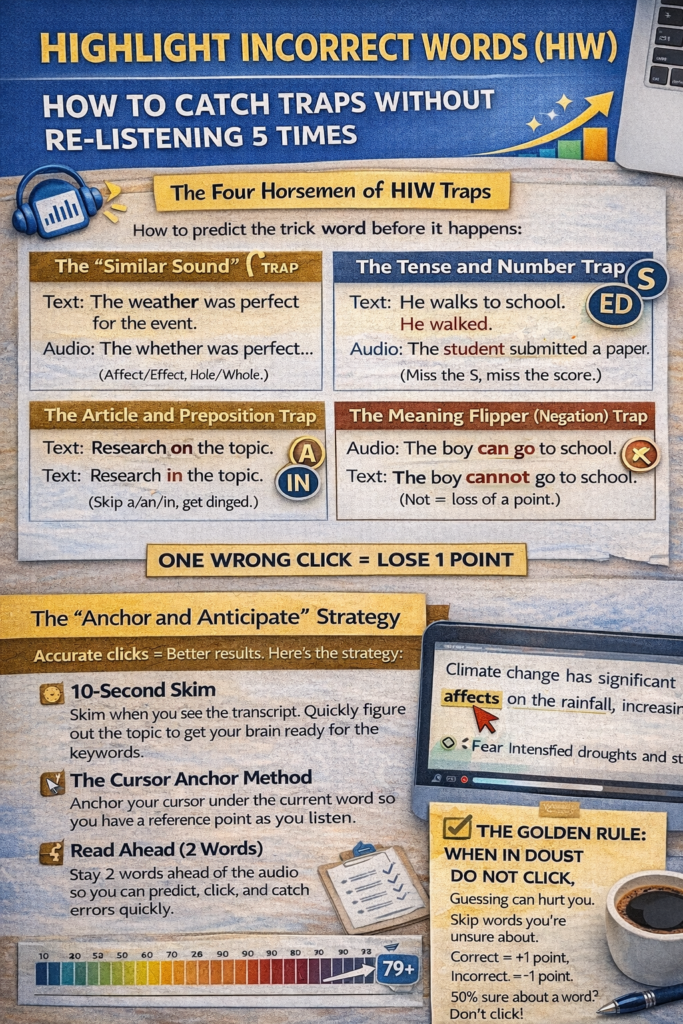
The Four Horsemen of HIW Traps
The errors in HIW aren’t random. I’ve analyzed hundreds of these, and they almost always fall into these four “trap” categories. If you know what to listen for, they become easy to catch.
1. The “Similar Sound” (Homophone) Trap
This is the most common way students lose points. The speaker says one thing, but the text shows a word that sounds almost identical.
-
Text: “The weather was perfect for the event.”
-
Audio: “The whether was perfect…” (Wait! That makes no sense! Click it.)
-
Other common pairs: Affect/Effect, Principle/Principal, Hole/Whole, There/Their.
2. The Tense and Number Trap (The “S/ED” Traps)
The computer loves to add or remove a single letter to trip you up.
-
Tense: The text says “He walks to school,” but the audio says “He walked.”
-
Plurals: The text says “The student submitted a paper,” but the audio says “students.”
-
Tip: Listen specifically for the “hiss” of an S or the “d/t” sound of an ED at the ends of words.
3. The Article and Preposition Trap
These are tiny words that students often overlook because they are “meaningless” in daily conversation.
-
Articles: The text says “a university,” but the audio says “the university.”
-
Prepositions: The text says “Research on the topic,” but the audio says “Research in the topic.”
4. The Meaning Flipper (Negation)
Sometimes, the error is a word that completely flips the meaning of the sentence.
-
Audio: “The boy can go to school.”
-
Text: “The boy cannot go to school.” One word changes the entire narrative—always be on the lookout for not, never, can, and cannot.
The “Anchor and Anticipate” Strategy
To beat these traps, you need to be faster than the audio. You can’t just react; you have to predict.
Step 1: The 10-Second Skim
You get 10 seconds before the audio starts. Use it! Don’t try to read every word. Instead, skim to get the gist of the topic. If you know the passage is about “Climate Change,” your brain will already be ready for words like environment or atmosphere.
Step 2: The Cursor Anchor Method
This is my top recommendation for all my students. Place your mouse cursor directly under the word the speaker is currently saying.
-
Why? It keeps your eyes and ears perfectly synchronized. When you hear a word that doesn’t match what is under your cursor, the mismatch becomes glaringly obvious.
Step 3: Read Ahead (Stay 2 Words Ahead)
Don’t wait for the speaker to reach a word before you look at it. Try to stay 2–3 words ahead of the audio in the transcript. This allows your brain to “anticipate” what is coming. If the speaker says something different than what you’ve already read, you can click it instantly without falling behind.
Step 4: Focus on the “Content Words”
While small words (like a or of) can be changed, the big points are usually in the Nouns, Verbs, and Adjectives. These are “content words” that carry the weight of the sentence. Pay extra attention when the speaker reaches these.
The Golden Rule: When in Doubt, DO NOT CLICK
This is the most important lesson I teach. Because of the negative marking, guessing is your worst enemy.
The math is simple:
-
A correct click = +1 point.
-
An incorrect click = -1 point.
-
Missing an incorrect word = 0 points.
If you are only 50% sure about a word, it is mathematically better to leave it alone. It’s always better to walk away with a +3 for the words you’re sure about than a +1 because you guessed on two others.
How to Practice Without Getting Overwhelmed
-
Vary Your Accents: The PTE uses a mix of British, American, and Australian speakers. Listen to the news from different countries to get used to how “schedule” can sound like “shed-yool” or “sked-yool.”
-
Use AI Scoring Portals: Practice on tools like Gurully or ApeUni. They use the same logic as the real exam and will show you exactly which words you missed.
-
The Subtitle Shadow: Watch a video with subtitles, but find one where the subtitles are slightly different from the audio (like a live news broadcast). Try to spot every mismatch in real-time.
Keep your cursor moving, keep your eyes ahead, and only click when you’re 100% sure. I’ll see you on the results page!